
Plans and Billing
Compare Free, Plus, and Pro plans and manage your subscription.
FAQ ↓Jenni offers three plans (Free, Plus, and Pro), each with different usage limits and feature access. You can view your current plan, upgrade, downgrade, or manage payment methods from the billing settings.
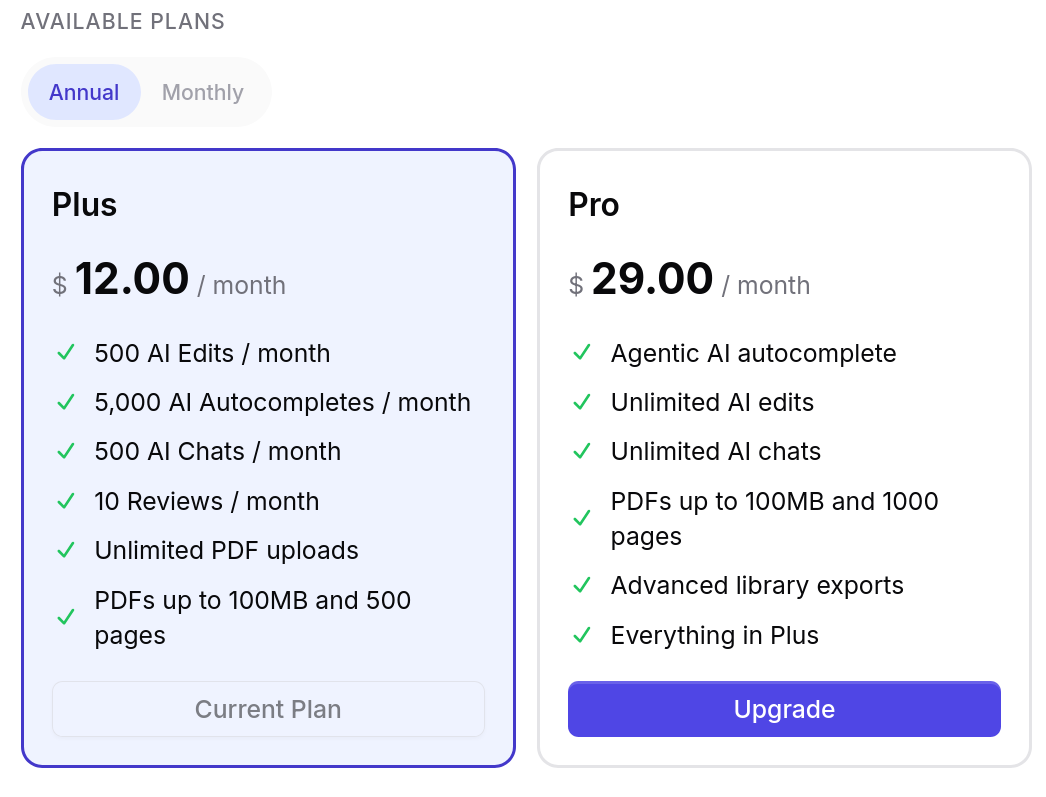
Viewing Your Current Plan
Click the gear icon in the sidebar to open Settings, then select the Billing tab. This page shows your current plan, feature usage for the current cycle, and the next renewal date.
Plan Comparison
| Feature | Free | Plus | Pro |
|---|---|---|---|
| Autocompletes | 10/day | 5,000/month | Unlimited |
| AI edits | 5 (one-time) | 500/month | Unlimited |
| AI chat messages | 5 (one-time) | 500/month | Unlimited |
| Reviews | 3/month | 10/month | Unlimited |
| PDF uploads | 10 | Unlimited | Unlimited |
| Max upload size | 25 MB | 100 MB | 100 MB |
| Page limit | 150 | 500 | 1,000 |
| Library exports | — | Yes | Yes |
| All export formats | — | Yes | Yes |
| Citation styles | — | Yes | Yes |
| Document publishing | — | Yes | Yes |
| Support | — | Live chat | Priority |
Trial Period
New users receive a trial of premium features. The number of remaining trial days is displayed in the sidebar. You have full access to premium features during the trial. Subscribe before it ends to keep premium access. If you do not subscribe, your account reverts to the Free plan.
Subscription Management
Upgrading
There are two paths to upgrade:
- From the editor — Click the Upgrade button that appears in the usage banner or the sidebar modal when you approach a limit.
- From Settings — Go to Settings > Billing > Change Plan, select your target plan, and complete checkout through Stripe.
Upgrades take effect immediately. If you upgrade mid-cycle, the charge is prorated for the remaining days.
Managing Your Subscription
- Upgrades apply immediately with prorated billing for the current cycle.
- Downgrades take effect at the start of the next billing cycle. You retain access to your current plan’s features until then.
- To change plans, go to Settings > Billing > Change Plan and select the new tier.
Cancellation
Cancel your subscription from Settings > Billing > Cancel Subscription. Subscriptions are recurring and you will be billed automatically until you cancel. After cancelling:
- You retain access to your current plan until the end of the billing period.
- Your subscription will not renew and you will not be charged again.
- Your documents and data are preserved.
- You can reactivate at any time by selecting a new plan.
To downgrade before your next payment date, go to Settings > Billing > Cancel Subscription. Your current plan stays active until the end of the billing period, then reverts to Free.
Refunds
Payments for Jenni AI subscriptions and enterprise licenses are generally not refundable.
If you believe your case warrants a refund due to a bug or error in the product, contact the support team at support@jenni.ai to schedule a call. During the call, you will be asked to demonstrate the issue so the team can investigate and resolve it.
Payment Information
Billing Options
Plans are available on monthly or annual billing cycles. Annual billing includes a discount compared to the monthly rate.
In select regions, Jenni also offers fixed-term payments (6-month or 12-month terms) with support for local e-wallet payment methods.
Payment Methods
Jenni accepts credit and debit cards (Visa, Mastercard, American Express) through Stripe. Regional payment methods are available in supported countries. All payments are processed through Stripe.
Regional Pricing
Pricing adjusts based on your location. Purchasing power parity (PPP) discounts are available in eligible regions and are applied automatically at checkout.
Billing History
Past invoices are accessible from Settings > Billing. Each invoice can be downloaded as a PDF. Receipts are also sent automatically to your account email after each payment.
Payment Expiry Warnings
If your payment method is about to expire, a banner appears at the top of the editor with a link to update your details. Keeping your payment method current prevents subscription interruption.
When You Hit a Limit
When you reach a usage limit, a banner appears in the editor explaining which limit was reached. AI features pause until the limit resets or you upgrade.
- Free autocompletes reset daily at midnight UTC.
- Free AI edits and chat messages are one-time allocations that do not reset.
- Plus limits reset monthly on your billing cycle date.
- Pro has no limits.
Limits Not Resetting
Free autocompletes reset at midnight UTC, not your local timezone. Plus limits reset on your billing cycle date, not the 1st of the month. Check Settings > Billing for your exact cycle date.
Hitting Limits Faster Than Expected
Each accepted autocomplete suggestion counts as one generation. AI edits and chat messages each count individually. Check your usage breakdown in Settings > Billing.
Troubleshooting
Payment failed. Check that your card details are correct and the card has not expired. Try a different payment method. If the issue persists, contact your bank to confirm the transaction is not being blocked, or reach out to Jenni support.
I was charged twice. Check your billing history in Settings > Billing for duplicate invoices. Apparent double charges often reflect a plan change mid-cycle — a prorated charge for the remainder of your old plan plus the first charge on the new plan. If you see two charges for the same billing period and did not change plans, contact support@jenni.ai with the invoice numbers.
Features not unlocking after payment. Refresh the page. Check Settings > Billing to confirm the plan updated. Allow a few minutes for payment processing to complete. Contact support if it continues.
I cancelled but was still charged. Cancellation takes effect at the end of your current billing period — you retain access until then and are not charged again after that date. If you were charged after your billing period ended, contact support@jenni.ai with your billing history.